Pixel Display: A Unique Blend of Digital and Hand-Drawn
Imagine a typeface that seamlessly blends the nostalgic, blocky charm of low-resolution digital graphics with the organic, hand-drawn feel of a sketch. That's Pixel Display, a unique hybrid font that stands out in the world of modern typography.
The Visual Charm of Pixel Display
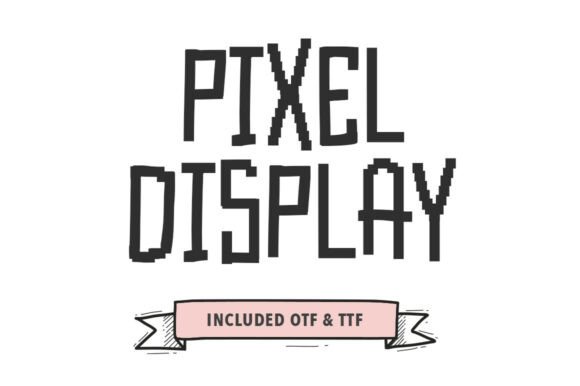
Pixel Display features tall, condensed characters that are built from visible, pixelated steps along the edges. This gives the font a distinctly retro, lo-fi personality. Yet, it maintains a loose, monolinear weight that feels as if it were sketched by hand. The intentional glitchy aesthetic adds a playful, contemporary twist, making it a versatile choice for various creative projects.
Ideal Applications for Creative Projects
Whether you're designing indie game titles, tech-themed social media content, creative coding blogs, or streetwear branding, Pixel Display offers a distinct digital-humanist edge. Its quirky, hand-drawn style can add a touch of uniqueness to your designs, setting them apart from the crowd.
- Indie Game Titles: Perfect for creating a retro, 8-bit vibe that resonates with gamers who appreciate a vintage aesthetic.
- Tech-Themed Social Media Content: Adds a cool, edgy look to posts, making them more engaging and shareable.
- Creative Coding Blogs: Enhances the visual appeal of your blog, making it more inviting and visually interesting.
- Streetwear Branding: Brings a fresh, urban feel to logos, packaging, and promotional materials, appealing to a younger, trend-conscious audience.
Influencing Readability and Brand Perception
When it comes to readability, Pixel Display is best used in larger sizes, such as headlines, titles, and short text blocks. Its condensed, tall structure makes it less suitable for long paragraphs but perfect for creating a strong visual hierarchy. In terms of brand perception, this font can communicate a sense of creativity, playfulness, and a nod to both retro and contemporary styles, making it ideal for brands that want to stand out and be remembered.
Practical Guidance for Using Pixel Display
Choosing Pixel Display for your project involves considering its fit, testing pairings, and reviewing included styles. Here’s how to get the most out of this premium font:
- Evaluate Project Fit: Determine if the font aligns with your brand's voice and the message you want to convey. Is a playful, retro feel right for your audience?
- Test Font Pairings: Experiment with pairing Pixel Display with clean, sans serif fonts for a balanced look. For example, combining it with a modern, minimalist sans serif can create a striking contrast.
- Review Included Styles: Check the available styles and weights to see which ones best suit your design needs. Consider using different weights for headings and subheadings to maintain consistency and professionalism.
- Readability Considerations: Use Pixel Display for impactful, short text elements like headlines and callouts. For longer text, opt for a more legible, traditional font.
- Commercial Licensing: Ensure you have the appropriate commercial license if you plan to use Pixel Display in client work or for large-scale distribution. This will help you avoid any legal issues and ensure you can fully leverage the font's potential.
Real-World Examples and Design Observations
One of the key strengths of Pixel Display is its ability to add a unique, human touch to digital designs. For instance, in logo design, the font can create a memorable, handcrafted look that stands out. In editorial design, it can be used for section headers and pull quotes to add a dynamic, eye-catching element. In web design, Pixel Display can be used for main headings and buttons, providing a visually engaging and interactive experience.
Overall, Pixel Display is a versatile and distinctive font that can elevate your design projects with its blend of retro and contemporary aesthetics. By carefully considering its application and pairing it thoughtfully with other design assets, you can create a compelling and professional brand identity that resonates with your audience.